Wedding planning and day-of tools, compared.

Compare Smart Invitations, RSVP reply days, personal Day-Of order and planner-reviewed recovery alongside the planning and business tools your team already uses.

The full picture

A transparent breakdown of how EventSync compares with commonly used planning and client-workflow tools.

  • Included Documented as described in the answer.
  • Qualified Partial, a different scope, or not established in reviewed public documentation. This does not mean a feature is absent.
  • Not built in Not part of the tool unless added manually.

Planning & guests

Planning Tools

EventSync
Included Workspace + mobile suite Checklist, budget, vendors, timeline, seating, handoff
Spreadsheets / Docs
Qualified DIY — build it yourself
Zola
Included Wedding planning, registry, website, and guest tools
Aisle Planner
Included Event-professional planning and project management
HoneyBook
Qualified Business clientflow: CRM, contracts, payments, and scheduling
Guest invitations and browser RSVP

EventSync
Included Personal invitation links + QR RSVP No guest account or app required; per-person replies, meal and permitted plus-one details
Spreadsheets / Docs
Qualified Forms and manual updates
Zola
Included Wedding website, guest list, and RSVP
Aisle Planner
Included Guest management, online RSVP, and messaging
HoneyBook
Qualified Client portal, not a wedding-guest RSVP system

Smart Invitations and reply days

EventSync
IncludedFamiliar RSVP + optional Smart InvitationsStart with Yes or No. With Smart on, guests choose a reply day inside your window, with bounded extra time when allowed. Track each person's attendance and reply day separately.See guest and host screens
Spreadsheets / Docs
QualifiedReply dates and attendance can be recorded manually in separate columns
Zola
QualifiedGuest list and online RSVP documented; a comparable guest-chosen reply-day workflow was not established in this review
Aisle Planner
QualifiedGuest management, online RSVP and messaging documented; a comparable reply-day workflow was not verified
HoneyBook
QualifiedClient forms and portal; a comparable wedding-guest reply-day workflow was not verified

Seating + Meal Handoff

EventSync
Included RSVP, tables, meals, dietary notes Caterer and venue handoff from the same guest list
Spreadsheets / Docs
Qualified Spreadsheet tabs and exports
Zola
Included Guest list, meal preferences, seating chart, and download/share
Aisle Planner
Included Guest management, seating, and planner exports
HoneyBook
Qualified Not wedding seating-focused

Marketplace / Registry Scope

EventSync
Qualified Registry links + curated venue search Not a full registry host or vendor marketplace
Spreadsheets / Docs
Not built in None unless you add links manually
Zola
Included Registry, wedding website, and vendor marketplace
Aisle Planner
Qualified Planner and vendor workflow, not a consumer registry hub
HoneyBook
Qualified Business CRM, not a consumer marketplace

Wedding day

Day-of Coordination

EventSync
Included Live timeline + SmartRipple Planner-approved updates across role views
Spreadsheets / Docs
Qualified Manual timeline updates
Zola
Qualified Planning tools; no comparable live role-based command identified
Aisle Planner
Qualified Project timelines and shared planning tools; no comparable live role-based command identified
HoneyBook
Qualified Clientflow platform; no comparable wedding-day command identified

Offline Mode

EventSync
Included Cached reads and supported edits Supported edits sync after reconnecting
Spreadsheets / Docs
Qualified File-based (if downloaded)
Zola
Qualified Offline scope not confirmed in reviewed public materials
Aisle Planner
Qualified Responsive web access; offline scope not confirmed
HoneyBook
Qualified Offline scope not confirmed in reviewed public materials

Role-Aware Day-Of Command

EventSync
Included Role-specific Day-Of views Planner, DJ, photographer, caterer — tailored operational content under one live system
Spreadsheets / Docs
Qualified No comparable live role-based command identified
Zola
Qualified No comparable live role-based command identified
Aisle Planner
Qualified Team permissions and client portal; no verified live role-based command
HoneyBook
Qualified Team roles and permissions; not a wedding-day command center

Personal Day-Of working order

EventSync
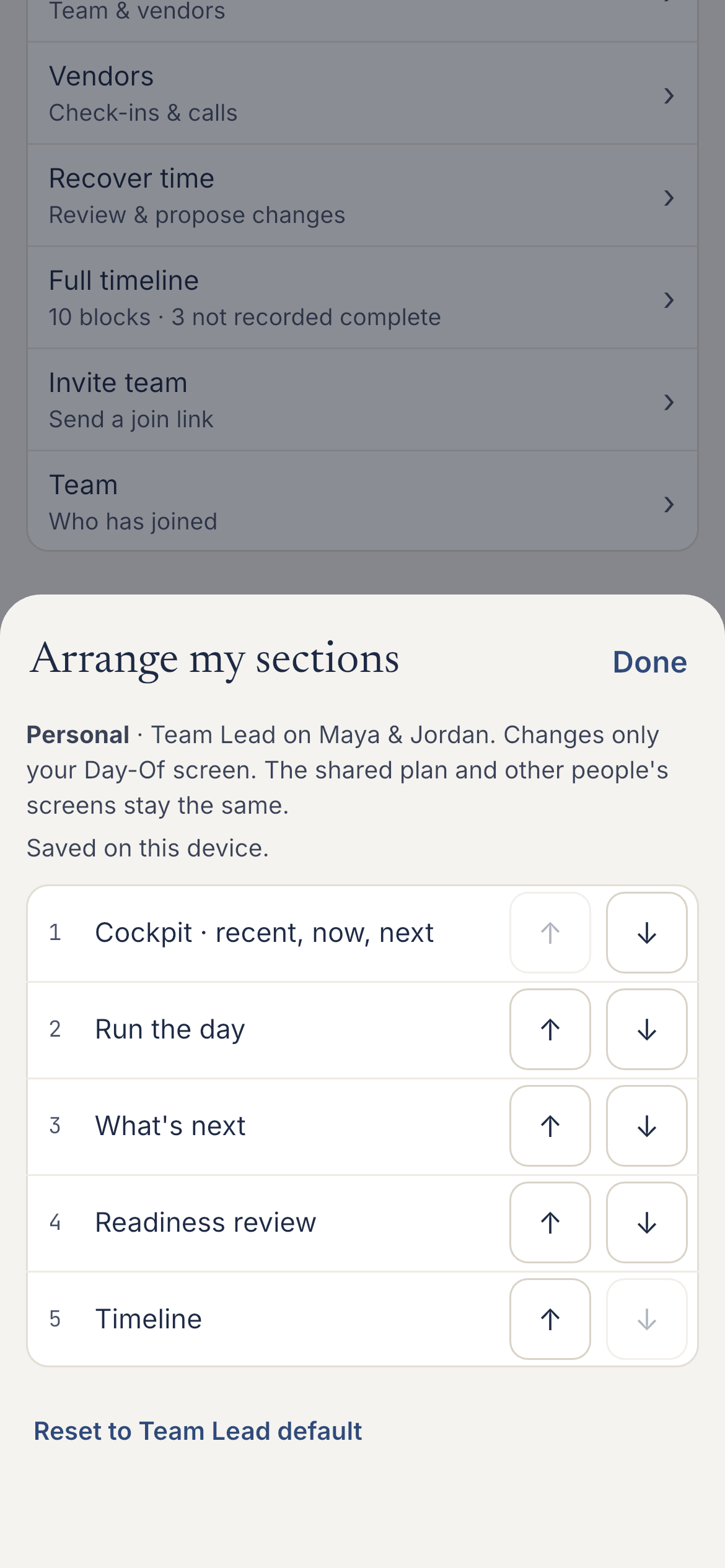
IncludedArrange sections and photo prioritiesSaved on your device; the shared timeline and other people's screens keep their order
Spreadsheets / Docs
Arrange a personal document or sheet manually
Zola · Aisle Planner · HoneyBook
Personal Day-Of section and photo-priority ordering was not established for these products in this review. This is not a claim that they lack customization.

Team Updates / Notifications

EventSync
Included Role-targeted broadcasts Acknowledgement when requested; sending and receiving require connectivity
Spreadsheets / Docs
Qualified Email / text manually
Zola
Qualified Guest text and messaging; no verified operational broadcast workflow
Aisle Planner
Qualified Team, client, and guest messaging with notifications
HoneyBook
Qualified Task assignment, automations, and email/SMS notifications

Planner-Reviewed Schedule Recovery

EventSync
Included Planner-reviewed recovery Review the impact, apply the recovery, then confirm the team update separately
Spreadsheets / Docs
Qualified Manual timeline updates; no comparable recovery workflow identified
Zola
Qualified No comparable recovery workflow identified in reviewed public materials
Aisle Planner
Qualified Timeline changes; no comparable recovery workflow identified
HoneyBook
Qualified No comparable recovery workflow identified in reviewed public materials

Assistant conversation with saved wedding context

EventSync
Included Wedding Day Assistant Workspace conversation using permitted wedding details; eligible timeline proposals need explicit review and confirmation
Spreadsheets / Docs
Qualified General-purpose AI tools
Zola
Qualified AI wedding-planning guidance; features vary
Aisle Planner
Qualified No wedding-day-specific AI capability verified in reviewed public materials
HoneyBook
Qualified Cross-industry business AI; not wedding-day-specific

Vendor Check-in

EventSync
Included Arrival check-ins and calls Confirm readiness with the vendor; an arrival is not proof of completed setup
Spreadsheets / Docs
Qualified Manual tracking
Zola
Qualified Marketplace to discover, inquire with, and book vendors; no live check-in identified
Aisle Planner
Qualified Vendor and project management; no live check-in identified
HoneyBook
Qualified Clientflow tools; no live vendor check-in identified

Price

Price

EventSync
Price Free planning; paid Day-Of access Free planning, Wedding Pass $49.99, Assistant Pass $99.99, Pro from $79.99/qtr
Spreadsheets / Docs
Price Free Google Sheets, Notion, etc.
Zola
Price Free + upgrades Free core planning and website tools; paid upgrades
Aisle Planner
Price From $49.99/mo Project-management plans from $69.99/mo
HoneyBook
Price From $29/mo US Starter price when billed yearly; see current plans

Competitor details reflect official public documentation, refreshed October 27, 2026 and can vary by plan or location. See Zola, Aisle Planner, and HoneyBook for current terms. “Not identified” means the reviewed documentation did not establish that workflow, not that a feature is absent.

This table covers general planning and business tools. Dedicated timeline products also support wedding-day work: Timeline Genius documents tailored timelines, bulk time changes and wedding-day reminders. Read the focused EventSync and Timeline Genius comparison.

A shared plan. Your own working order.

Move the tools you need first to the top of your own screen. Keep photo priorities in your own order while the whole wedding stays on the shared timeline.

Native Arrange my sections panel explaining that personal order is saved on this device

Put your next tool within reach.

Arrange the cockpit, Run the day and other sections for your role. This does not reschedule the wedding or change anyone else's view.

Try personal arrangement
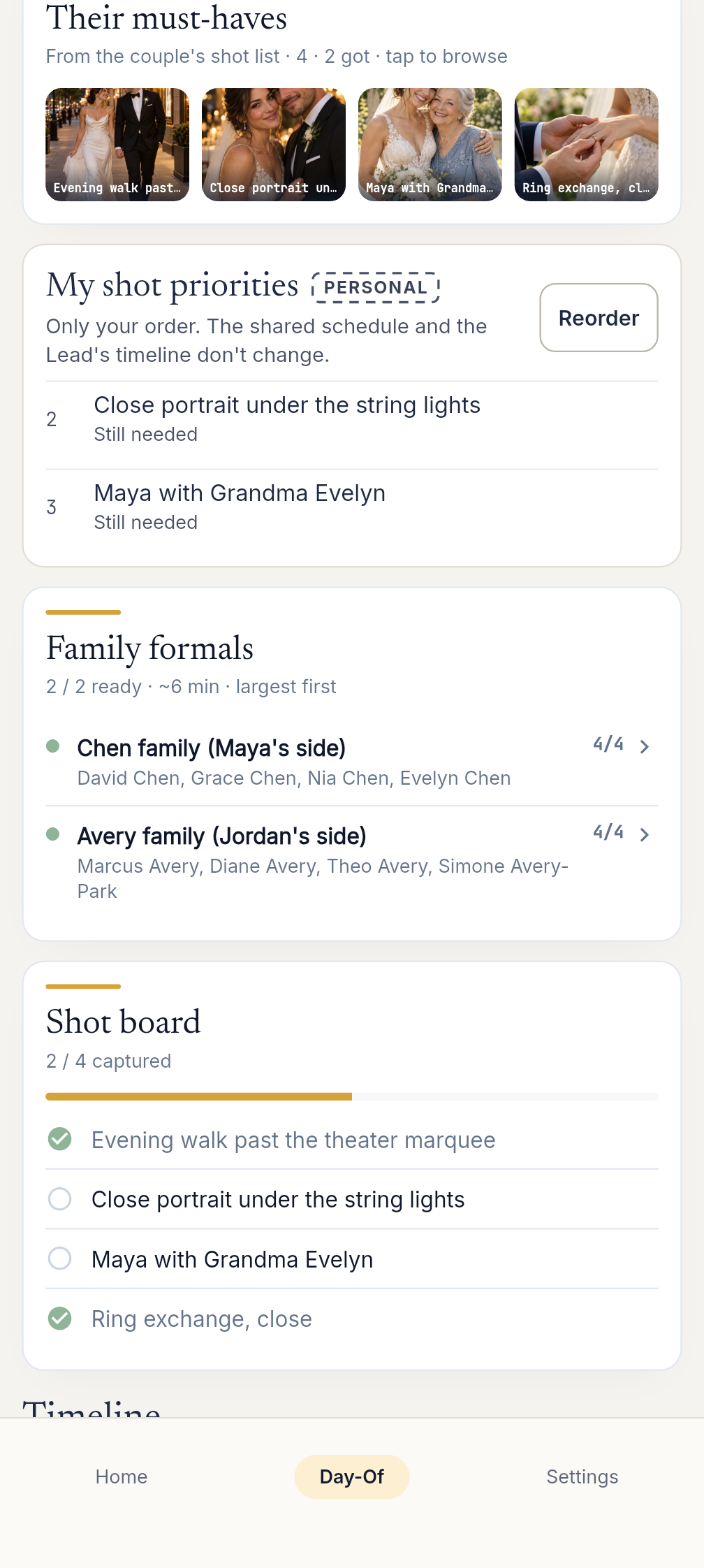
Native Photographer view with personal photo priorities beside the wedding plan

Keep your photo priorities close.

Reorder the shots you want to work through first. A captured-photo check stays separate from a timeline activity's completion.

Explore photo priorities

Unaltered native captures with fictional wedding records. Photo references are generated inspiration.

A reply day you can plan around.

Familiar RSVP starts with Yes or No. Turn on optional Smart Invitations when guests need a day to answer within a window you set. You can see that plan to reply beside their attendance, without counting it as an acceptance.

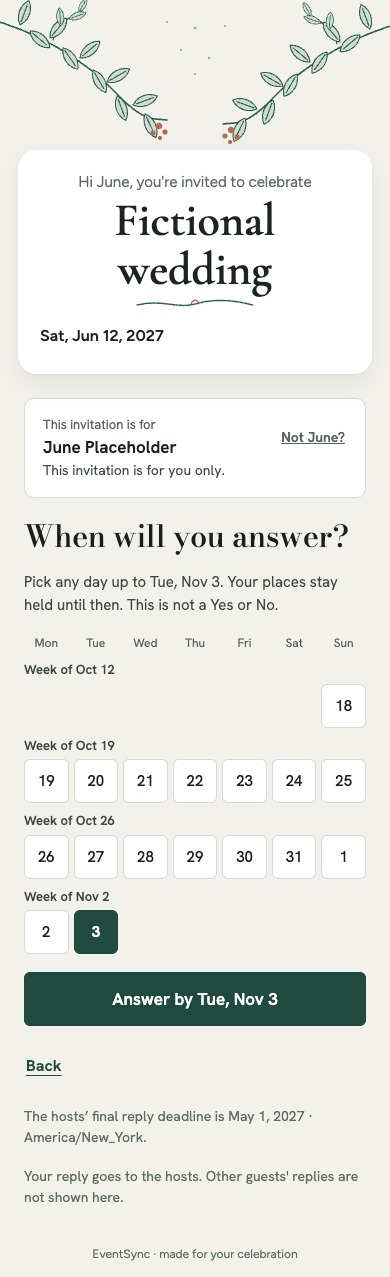
Released guest invitation UI asking When will you answer, with a calendar inside the hosts' window and no attendance reply saved

Let the guest choose a day.

Guests open their own link in a browser. With Smart on, they can choose a reply day inside your window. If you allow extra time, they can choose a later day within your limits. A saved day leaves attendance unanswered.

Explore Smart Invitations
Released host Guest List widgets showing attendance, held places and reply day as separate columns for fictional people

Know whose answer is still coming.

Track each named person's reply, including separate guardian and child answers. Record a reply received by phone or in person with its source. Review requests to attend after a decline before offering a place.

Turning Smart on does not send invitations or reminders. Reminder preparation and approval say “Nothing sent.” An unanswered invitation does not automatically become a No.

See the guest and host workflow

Guest capture: released invitation page with fictional details. Host capture: released widgets with fictional records in an isolated test harness. These images do not submit a response or send a message.

The story behind the checkmarks

Numbers and symbols only tell part of the story. Here's what actually matters when your wedding day arrives.

⏰

Built for the planning desk and the wedding day itself

Planning tools take care of months of checklists, budgets, and vendor research. EventSync Workspace brings that work to the desktop, then mobile Day-Of Command keeps the same wedding live when the ceremony starts: a real-time timeline, planner-approved updates, and SmartRipple recovery when something runs long.

👥

One Day-Of Command, role-aware content

EventSync gives the whole team one shared Day-Of Command — same live timeline, same status — with the operational content underneath tailored to who you are. The caterer sees service details, the photographer sees photo priorities, and the couple sees the next planned moment. Every crew role still sees the whole shared timeline.

📷

Works when the WiFi doesn't

Outdoor barn venues, mountain retreats, beachside ceremonies — some of the most beautiful wedding locations have the worst cell service. EventSync is built offline-first, meaning saved timeline and supported day-of information remain available on the native app without a connection. Supported edits sync after reconnecting; check any sync warnings. Sending broadcasts, Assistant conversations and receiving new team updates or server-delivered notifications require connectivity.

🤝

Honest about the competition

We believe in building a great product, not tearing others down. Zola has a strong registry, wedding-website, and vendor-marketplace offering. Aisle Planner is a solid workflow tool for professional planners. HoneyBook excels at client management, invoicing, and business operations. These are good tools for what they do. EventSync focuses on live, role-aware wedding-day coordination.

Compare EventSync to specific tools

Two close wedding-timeline comparisons are maintained separately. Broader planning and business tools stay in the matrix above so you can compare the workflow without relying on thin, fast-aging competitor pages.

On Android? See the wedding day-of app for Android →

Ready to see for yourself?

Start free in EventSync Workspace, then continue the same wedding on mobile when it is time for Day-Of Command.