Timeline Genius alternative · for couples and wedding pros

The Timeline Genius alternative built as a real app.

Timeline Genius is a capable web planner: you build the timeline in a browser and set text reminders in advance for the wedding day. EventSync adds the layer that runs the day itself — a native app in every vendor's pocket that sends live updates and offers planner-reviewed SmartRipple recovery when a block runs long.

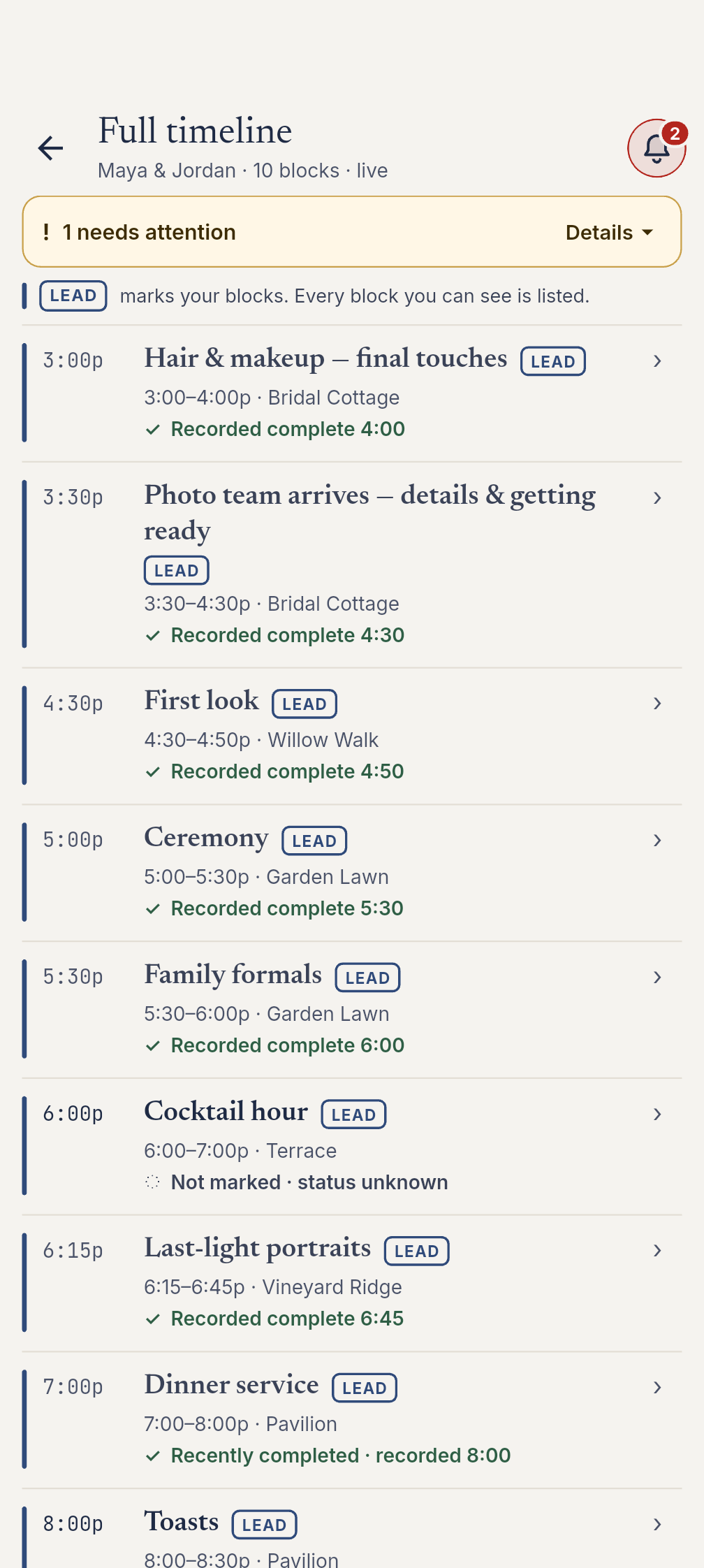
EventSync timeline view showing live wedding blocks
Wedding day 4:47 PM

The 4:47 moment.

WEDDING DAY · 4:47 PM. The ceremony's running fifteen minutes long. The text reminders Timeline Genius scheduled this morning already went out at the times you set. EventSync flags the overrun and SmartRipple previews updated timing across downstream blocks. An authorized planner or team lead reviews and applies the recovery before affected-role views change. SmartRipple recovery is included free with Day-Of.

The core difference

Planning software builds the day. A day-of app runs it.

Both products can help you organize a wedding timeline. The question is what happens when the day starts moving.

01

Native app vs browser

EventSync ships as a native iOS and Android app. Works offline at the venue: the Day-Of app reads and writes to a local on-device database, queues changes, and syncs automatically when the connection returns.

Timeline Genius: web-based and mobile-friendly in a browser.

02

Live push vs pre-scheduled texts

Native push notifications delivered by the OS even when the app is closed. When online, the whole team sees Day-Of timeline and status changes update live across devices.

Timeline Genius: text reminders set in advance for the times you choose.

03

Role-specific boards vs filtered views

Every crew and guest role gets its own purpose-built Day-Of view — photographer, videographer, caterer, venue, DJ/MC, assistant, generic vendor, plus calm receive-only views for guests, wedding party, family, and the couple.

Timeline Genius: tailored views of one shared timeline.

04

Planner-reviewed recovery vs manual updates

SmartRipple previews updated timing across downstream blocks. An authorized planner or team lead reviews and explicitly applies the recovery before the timeline or affected-role views change. Included with Day-Of at no extra charge.

Timeline Genius: timeline changes are made in the planner, with reminders based on what was set.

Comparison table

EventSync vs Timeline Genius, read like an audit.

Timeline Genius is an established, capable web planner with live collaboration and mobile-browser access. EventSync is the native day-of execution layer.

Last verified: July 8, 2026
Area EventSync Timeline Genius
Platform EventSync ships as a native iOS and Android app, so every vendor runs the wedding day from their own phone — no browser login on the day. Web-based planner with mobile-browser access.
Offline venue use Works offline at the venue: the Day-Of app reads and writes to a local on-device database, queues changes, and syncs automatically when the connection returns. The newest edit wins on a conflict. Requires browser access and connection for the web app.
Live timeline changes When online, the whole team sees Day-Of timeline and status changes update live across devices. Live collaboration in a web planner.
Notifications Native push notifications delivered by the OS even when the app is closed. Text reminders set in advance.
Coordinator controls In the lead/planner cockpit, coordinators mark blocks complete, undo, or skip; the app flags overruns automatically; every change syncs live. Timeline-building and event management happen in the web planner.
Schedule recovery SmartRipple previews updated timing across downstream blocks. An authorized planner or team lead reviews and explicitly applies the recovery before the timeline or affected-role views change. Included with Day-Of at no extra charge. Bulk time-shifting is available for timeline edits.
Team broadcasts Role-targeted team broadcasts — send to Everyone or specific crew roles, with an Urgent high-priority option and acknowledgement tracking, delivered as push. Text reminders can be scheduled to key players in advance.
Next-up alerts "Next event in ~10 minutes" alerts — server-scheduled push plus on-device notification (when enabled). Text reminders are set for chosen times.
Vendor late alerts Vendor-late alerts notify the team lead when a vendor is overdue; wedding-day reminders fire 7 days out, 2 days out, and the morning of. Vendor contact and file details can live in the timeline workspace.
Role views Every crew and guest role gets its own purpose-built Day-Of view, driven by the event's real timeline and guest data. Filtered/tailored views of one shared timeline.
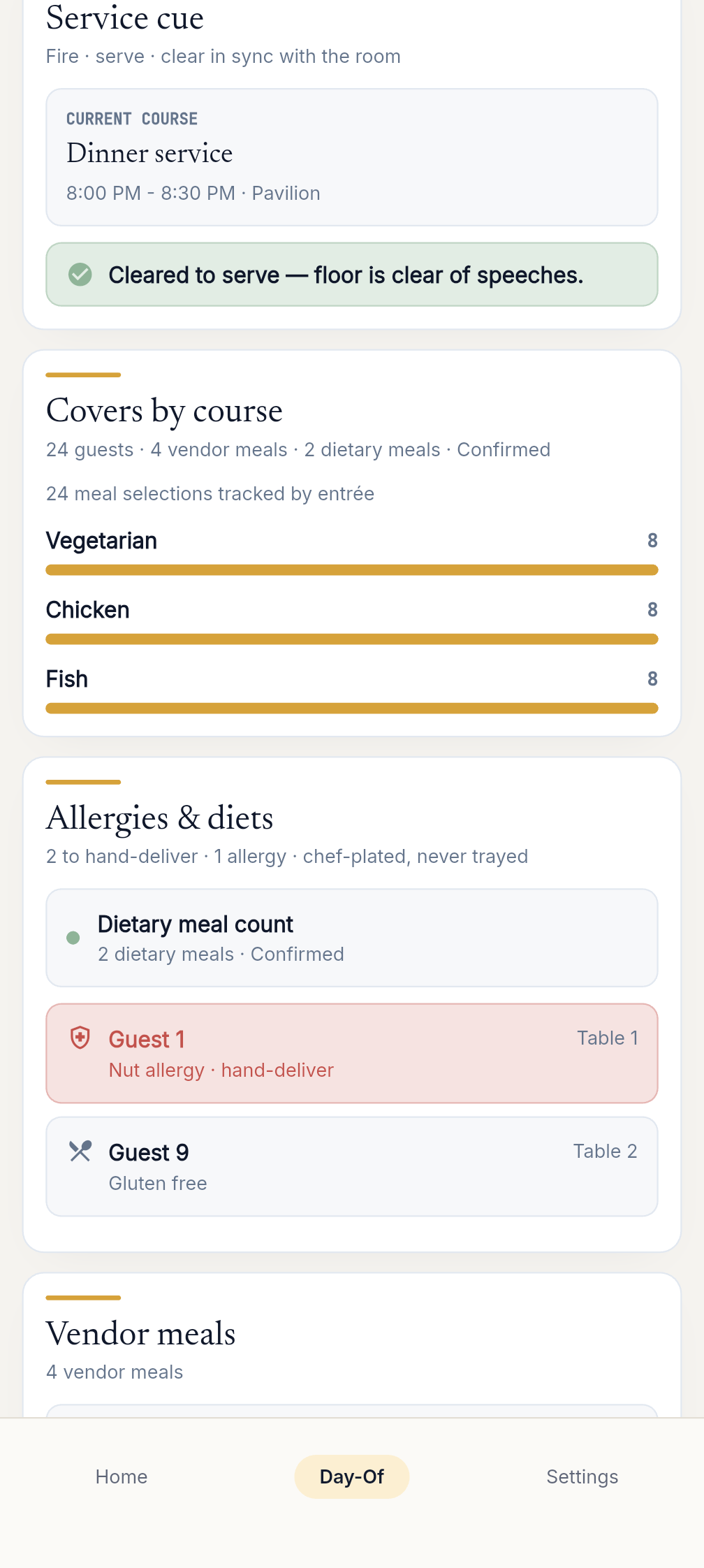
Catering board The caterer's board shows seat-level allergy/dietary flags and covers by meal selection, computed from the couple's actual guest list. Guest and vendor details can be managed in the planning workflow.
Photo family formals The photographer's board lists family-formal groups with each member by name and a live present/total ready-count. Tailored timeline views can show relevant timeline items.
Permissions 12 team roles with server-enforced permissions, including guards against privilege escalation. The day-of runner role is the Team Lead. Team members can collaborate in the web planner.
Guest RSVP Secure guest RSVP via signed, expiring links capturing attendance, meal preference, dietary restrictions, and plus-one. Focused on timeline and planning workflows.
Run-of-show import Import your run-of-show from Timeline Genius, a spreadsheet/CSV, or pasted text, with duplicate detection and confidence flagging. Exports and shares timeline outputs from Timeline Genius.
Guest imports Import guest lists from Zola, The Knot, WeddingWire, Joy, or any CSV, plus device contacts and pasted names. Not positioned as a full EventSync-style guest data system.
Exports Export the guest list, budget, checklist, and vendor contacts as CSV or a branded PDF — attribute to EventSync Workspace (web). Professional timeline PDF sharing is available.
Planning workspace EventSync Workspace (web) is a full desktop planning app: checklist, run-of-show builder with starter templates, budget, vendor directory with contracts, guest list, drag-and-drop seating chart, couple permissions, planning viewers, progress dashboard, and export — all on the same synced data as the mobile app. Established web planning product for timelines, checklists, collaboration, files, contacts, time tracking, and branded outputs.
Pricing model Free planning, one-time wedding passes, and Pro plans are available. SmartRipple recovery is free with any Day-Of access; the Wedding Day Assistant is a paid upgrade. Ongoing subscription and event-package pricing are listed publicly; see timelinegenius.com for current rates.

Last verified July 8, 2026. Re-check both products before publishing or using this page in paid campaigns.

Why teams switch

Five EventSync differentiators, stated as verified product facts.

The difference is not that Timeline Genius is weak. It is that EventSync is built for the live wedding day, from the phone in each person's hand.

Verified · Jul 8 2026

Native on both platforms

EventSync ships as a native iOS and Android app, so every vendor runs the wedding day from their own phone — no browser login on the day.

Verified · Jul 8 2026

Offline at the venue

Works offline at the venue: the Day-Of app reads and writes to a local on-device database, queues changes, and syncs automatically when the connection returns. The newest edit wins on a conflict.

Verified · Jul 8 2026

Live recovery and role-aware alerts

SmartRipple previews updated timing across downstream blocks. An authorized planner or team lead reviews and explicitly applies the recovery before the timeline or affected-role views change. Included with Day-Of at no extra charge.

Verified · Jul 8 2026

Purpose-built role boards

Every crew and guest role gets its own purpose-built Day-Of view — photographer, videographer, caterer, venue, DJ/MC, assistant, generic vendor, plus calm receive-only views for guests, wedding party, family, and the couple — driven by the event's real timeline and guest data.

Verified · Jul 8 2026

The same data from planning to day-of

EventSync Workspace (web) is a full desktop planning app: checklist, run-of-show builder with starter templates, budget, vendor directory with contracts, guest list, drag-and-drop seating chart, couple permissions, planning viewers, progress dashboard, and export — all on the same synced data as the mobile app.

EventSync caterer board showing meal counts and seat-level dietary flags for a wedding reception
Paid upgrade

Meet the Wedding Day Assistant.

The Wedding Day Assistant reads the day for you. It is a rules-based briefing layer that turns your timeline into the right prompt at the right moment for each role.

It turns the plan into live, hands-free guidance. It reads the wedding-day timeline and each person's role and surfaces focus cards — short readiness briefings that tell each crew member what to prep now, what's coming next, and what needs their attention, so nobody keeps scrolling the master schedule.

SmartRipple is the free recovery engine. Role boards are the free per-role views. The Wedding Day Assistant is the paid, proactive briefing layer on top.

What to prep now

A short readiness briefing for the person's role at the current point in the timeline.

What's coming next

A concise look-ahead so the crew member can stage the next handoff without scanning the master schedule.

What needs attention

A role-specific prompt when the timeline or status says something needs the crew member's focus.

EventSync Wedding Assistant showing a planner-reviewed recovery suggestion
Switch without rebuilding

Already on Timeline Genius? Bring your run-of-show.

You don't have to rebuild the day from scratch. Paste your Timeline Genius timeline or import a spreadsheet, and EventSync brings in your blocks with duplicate detection and confidence flagging.

  • Import your run-of-show from Timeline Genius, a spreadsheet/CSV, or pasted text, with duplicate detection and confidence flagging.
  • Import guest lists from Zola, The Knot, WeddingWire, Joy, or any CSV, plus device contacts and pasted names.
  • Export the guest list, budget, checklist, and vendor contacts as CSV or a branded PDF through EventSync Workspace (web).
Start with your existing timeline
Pricing

Pick the pass that matches how many weddings you run.

SmartRipple recovery is free with any Day-Of access; the Wedding Day Assistant is a paid upgrade.

Free

$0 forever

Full planning workspace + 1 wedding.

Wedding Pass

$49.99 one-time

Day-Of tools for one wedding.

Wedding Day Assistant Pass

$99.99 one-time

Day-Of + the Wedding Day Assistant.

Pro Basic

$249.99/yr or $79.99/qtr

Day-Of on unlimited weddings.

Pro Assistant

$399.99/yr or $129.99/qtr

Pro + the Wedding Day Assistant.

Timeline Genius pricing is an ongoing subscription. Check timelinegenius.com for current rates before comparing purchase options.

FAQ

Questions couples and planners ask before switching.

Does Timeline Genius have a mobile app?

Timeline Genius is web-based and mobile-friendly in a browser; as of July 8, 2026 it doesn't offer a native iOS or Android app. EventSync is a native app on both platforms, so vendors run the day from their phones, and it keeps working offline when the venue has no signal.

Does Timeline Genius work offline?

Timeline Genius needs a browser connection. EventSync's Day-Of app works offline on iOS and Android: it reads and writes to a local database, queues edits, and syncs automatically when the connection returns (newest edit wins on a conflict).

How does each handle wedding-day reminders?

Timeline Genius lets you set text reminders in advance. EventSync sends live native push instead — role-targeted broadcasts, a "next event in about ten minutes" alert, and a heads-up to the lead when a vendor is running late — plus planner-reviewed SmartRipple recovery when a block runs over.

Can I move my Timeline Genius timeline into EventSync?

Yes. Paste your Timeline Genius run-of-show or import a spreadsheet or CSV, and EventSync brings your blocks in with duplicate detection.

Is EventSync only for wedding planners?

No. Couples can run their own day with a one-time Wedding Pass; planners, venues, and photographers use a Pro plan for unlimited weddings. Everyone shares the same live data across the web workspace and the mobile app.

How we compare

This page is a comparison, not a takedown.

EventSync's capabilities are verified against its own source code; Timeline Genius details reflect its public website, pricing page, and app-store presence as of July 8, 2026; products change, so verify at timelinegenius.com.

Timeline Genius is a trademark of its respective owner and is used here only for identification and comparison.

Last verified: July 8, 2026.

Run the day from the phones people already carry.

Native app, live push, free SmartRipple recovery, and role views built for the actual wedding day.

Run your next wedding on EventSync