Coordon alternative · for planners, couples, and vendors

Two capable wedding platforms. Different control models when the day changes.

Coordon combines web-and-mobile planning, AI timeline creation, direct cascading updates, guest and RSVP tools, and no-sign-up sharing. EventSync is designed for live wedding-day execution: role-tailored operating views, planner-reviewed recovery, and operational push for the people who need it. This is a fair comparison of two different strengths, not a claim that one app does everything better.

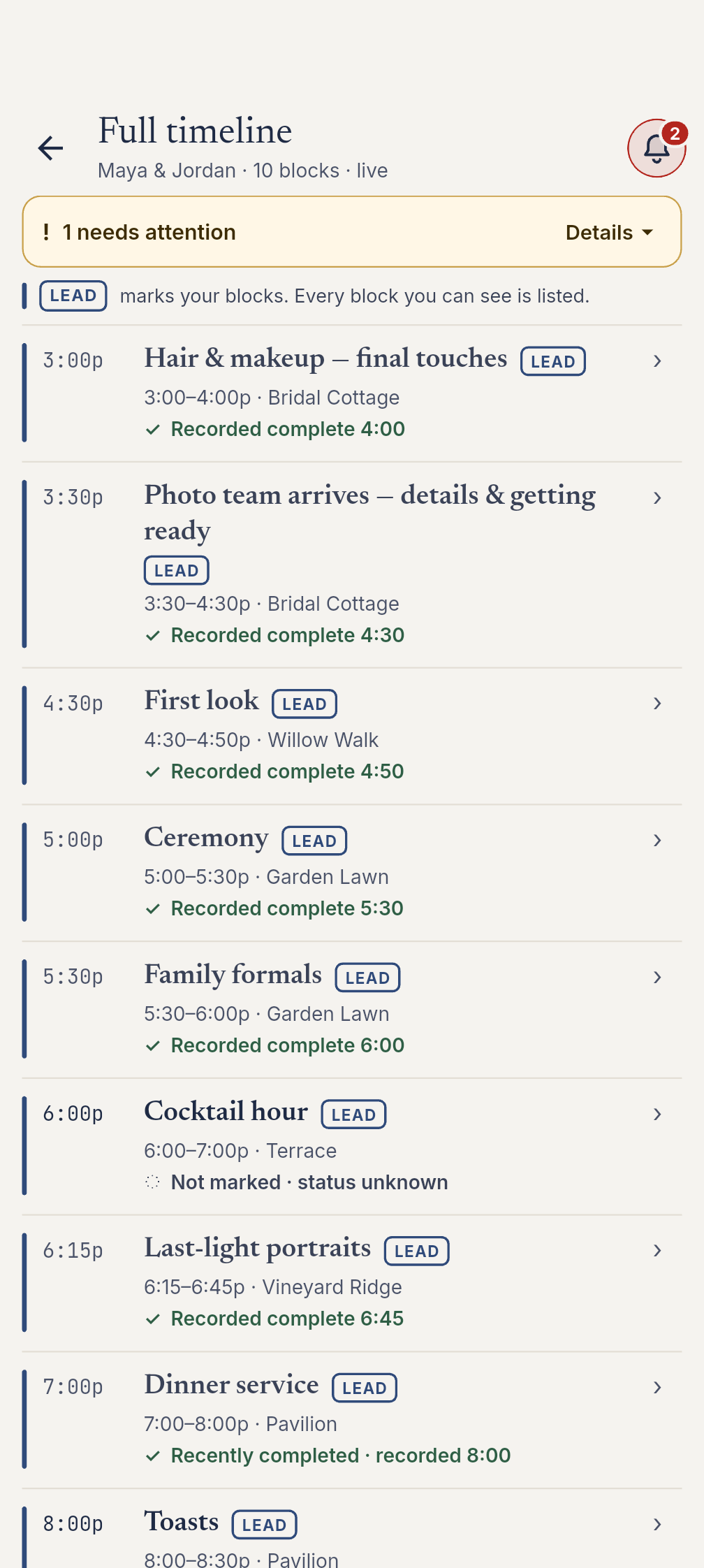
Current native full timeline with planned times, role tags and recorded completion in a fictional wedding
Unaltered native app capture with fictional wedding records.
Wedding day

The 12-minute gap.

The florist is twelve minutes behind. In Coordon, a planner can move the affected timeline item and cascade linked work. In EventSync, the lead receives a vendor-late alert; an authorized planner then reviews a SmartRipple recovery plan before applying it.

The core difference

Two capable wedding platforms. Different control models when the day changes.

Coordon and EventSync overlap on web-and-mobile planning, live timelines, guest tools, and collaboration. The useful distinction is how a schedule change is handled, how much operating context each role receives, and how clearly the team is alerted.

01

Role-tailored boards vs role and link visibility

EventSync: role-tailored Day-Of views driven by real event data — for example, the caterer sees seat-level allergy flags and covers by meal.

Coordon: Pro role management plus shared links with configurable task visibility. Its public materials do not describe specialized caterer or photographer operating boards.

02

Operational push vs collaborative updates

EventSync: role-targeted broadcasts with an urgent option and acknowledgement tracking, plus next-event and vendor-late alerts.

Coordon: documents real-time status, activity, notifications, and one-tap vendor communication. Public materials do not specify equivalent targeting, priority, acknowledgement, or vendor-late behavior.

03

Planner-reviewed recovery vs fast manual cascading

EventSync: SmartRipple flags an overrun, previews timing impact, and lets an authorized planner or team lead review before applying the recovery.

Coordon: lets a planner move an item so linked work cascades, including for last-minute venue and weather changes. It is a different, faster manual control model.

04

Wedding-day handoff vs broad all-in-one planning

EventSync: signed RSVP links and guest meal and dietary data feed into day-of handoffs such as the caterer board.

Coordon: publicly offers guest lists, RSVPs, meal choices, invitations, check-in, budgets, contacts, files, tasks, and templates in one planning-and-coordination product.

Comparison table

EventSync vs Coordon, read like an audit.

Coordon is strong at broad planning, AI timeline creation, no-login sharing, and direct cascading. EventSync is more specific about what happens when the wedding-day plan slips: planner-approved recovery, role-tailored operational context, and documented team alerts.

Last verified: August 7, 2026
AreaEventSyncCoordon (publicly documented)
Planning and mobile surface EventSync Workspace for web planning; native Day-Of app on iOS and Android. Web app plus native iOS and Android apps.
Broad planning and guest tools Checklist, budget, vendors, timeline, seating, guest list, and signed RSVP links. Guest lists, RSVPs, meal choices, invitations, check-in, budgets, contacts, files, tasks, and templates.
Timeline assistance Wedding Assistant conversations use the saved wedding details your account can access. Eligible timeline proposals require review and explicit confirmation. Timeline imports are a separate Workspace workflow. AI Timeline Assistant creates editable timelines from descriptions, PDFs, spreadsheets, Word files, or photos.
Live schedule change workflow Flags an overrun; an authorized planner or lead reviews and applies SmartRipple recovery. A planner moves an item; linked work cascades, including for last-minute venue or weather changes.
Role-specific operating context Role-tailored Day-Of views; real examples include caterer allergy and meal data, and photographer family-formal data. Pro role management plus shared links with timeline and configurable task visibility. Equivalent specialized operational boards are not described publicly.
Operational notifications Role-targeted push broadcasts with urgent priority and acknowledgements, next-event alerts, and vendor-late alerts to the lead. Real-time status, activity, notifications, and one-tap vendor communication are documented; exact targeting, acknowledgement, and escalation behavior is not publicly specified.
Vendor and client access Invited team members receive scoped Day-Of views and planner-controlled context. Unique, revocable no-sign-up links with timeline access and configurable task visibility.
RSVP and guest data Signed, expiring RSVP links; attendance, meal, dietary, and plus-one data feeds operational handoffs. Guest lists, RSVPs, meal choices, invitations, and check-in are advertised; public materials do not specify RSVP-link security details.
Offline behavior Local reads and writes, durable sync queue, automatic reconnect sync; conflicting or stale edits can require review. Offline mode and improvements are advertised; detailed write, queue, and conflict behavior is not publicly documented.
Templates and repeatable workflow Starter run-of-show templates plus custom planning templates. Timeline and task templates with relative offsets; completed events can be saved as templates.
Trial and team scale Free planning, one-time wedding passes, and Pro plans. 14-day no-card trial; Solo supports one user and Pro supports up to 10 users with unlimited events.

Last verified August 7, 2026. Coordon capabilities above reflect its features, AI assistant, timeline cascading, sharing, and pricing pages. Products change — re-check both before relying on this comparison.

Where EventSync is more specific

Wedding-day execution with a clear chain of command.

Coordon is genuinely capable at broad planning and rapid schedule changes. EventSync is more specific when a live wedding needs a protected recovery decision, role-tailored operating data, and explicit operational alerts.

Verified · Aug 7 2026

Governed recovery when timing slips

SmartRipple flags an overrun, previews the downstream impact, and requires an authorized planner or team lead to review and apply the recovery. It is included with Day-Of at no extra charge.

Verified · Aug 7 2026

Operational alerts with accountability

Role-targeted push broadcasts include an urgent option and acknowledgement tracking. EventSync also documents next-event alerts and a vendor-late alert to the team lead.

Verified · Aug 7 2026

Wedding data in the role view

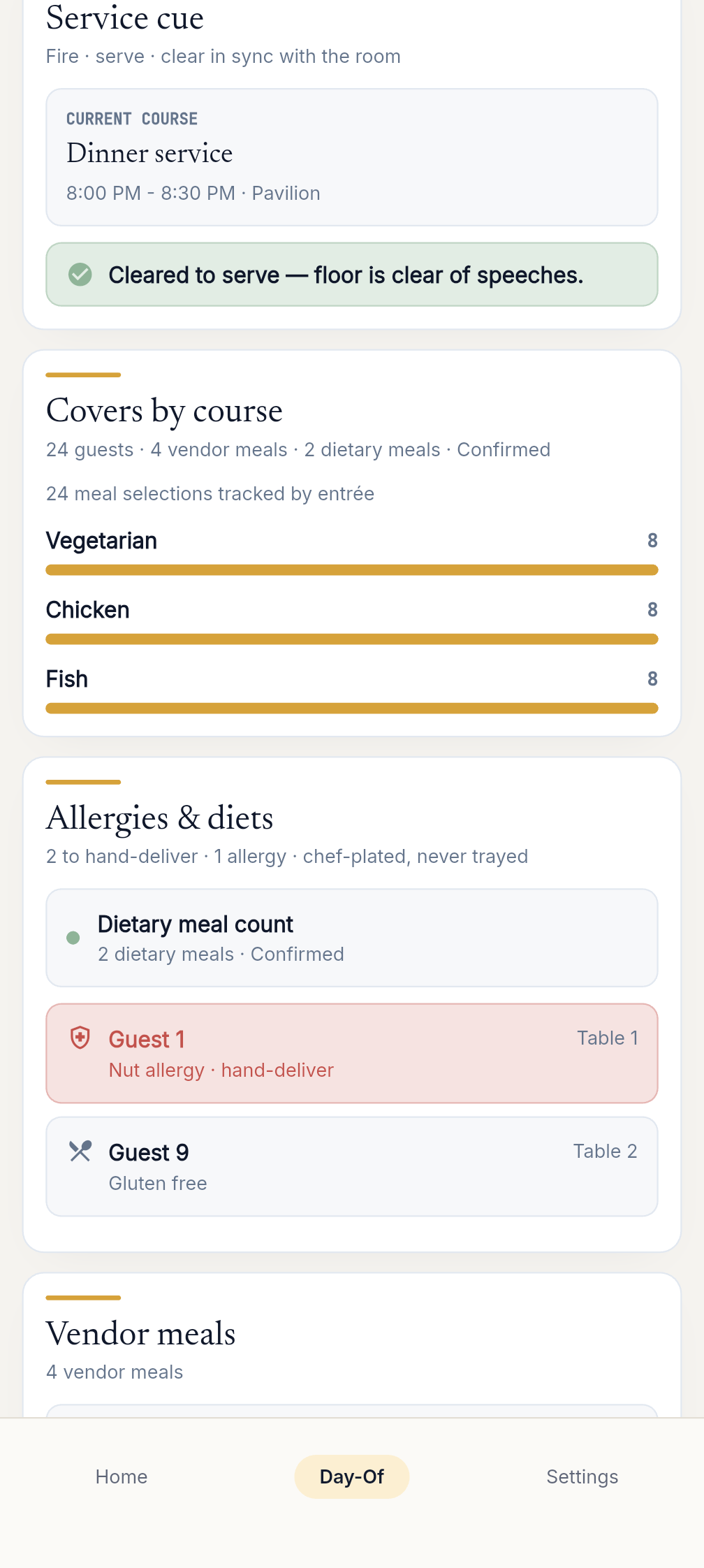
The caterer board is driven by real guest data: meal counts, table distribution, and seat-level dietary or allergy flags. Photographer family-formal data is also available in the Day-Of experience.

Verified · Aug 7 2026

Scoped command authority

Planner and lead roles hold the recovery and command controls. Other roles receive the Day-Of information they need without unrelated planner-only context.

Verified · Aug 7 2026

Documented offline execution

The Day-Of app reads and writes to a local database, durably queues changes, and syncs when the connection returns. Conflicting or stale edits can require review; check sync warnings after reconnecting.

Current native Caterer service board with meal counts, dietary flags and vendor meals in a fictional wedding
Unaltered native app capture with fictional wedding records.
Where Coordon is strong

What Coordon does better or more broadly today.

Coordon is the closest competitor to EventSync, and it has several real strengths that EventSync does not match one-for-one.

AI timeline creation from text and files

Coordon can turn a description, PDF, spreadsheet, Word file, or photo into an editable timeline. EventSync supports contextual Assistant conversations. Timeline imports and SmartRipple recovery are separate workflows; an authorized person reviews proposed changes before applying them.

Direct cascading changes

A planner can move one item and cascade linked work immediately, including for last-minute venue and weather changes. EventSync trades speed for a reviewed recovery flow when an overrun is detected.

No-login vendor and client sharing

Coordon provides unique, revocable links so each recipient can see the timeline and the tasks they are allowed to see without creating an account.

All-in-one planning convenience

Coordon publicly combines guests, RSVPs, meals, check-in, budgets, contacts, files, tasks, templates, and real-time coordination in one product.

Lock-screen timeline and planner-scale workflow

Coordon advertises live iOS lock-screen timeline tracking, reusable relative-offset templates, and a 14-day no-card trial with Solo and Pro plans for planner teams.

Paid upgrade

Meet the Wedding Day Assistant.

Wedding Assistant uses the saved wedding details you can access for planning and day-of conversations. Eligible timeline proposals require an authorized person to review and explicitly confirm before applying them.

SmartRipple and role views are included with Day-Of access. Premium Assistant conversations have separate access requirements. Personal section order changes only your view on your device, not the shared plan.

What to prep now

Ask what information is missing before the next handoff.

What's coming next

Discuss the saved timing, location and owner for the next handoff.

What needs attention

Ask about uncertain details, then confirm them with the responsible person.

Switch without rebuilding

Coming from Coordon? Bring your run-of-show.

Paste your run-of-show or import a spreadsheet or CSV, and EventSync brings your blocks in with duplicate detection and confidence flagging.

  • Import your run-of-show from a spreadsheet, CSV, or pasted text, with duplicate detection and confidence flagging.
  • Import guest lists from Zola, The Knot, WeddingWire, Joy, or any CSV, plus device contacts and pasted names.
  • Export the guest list, budget, checklist, and vendor contacts as CSV or a branded PDF through EventSync Workspace (web).
Start with your existing timeline
Pricing

Pick the pass that matches how many weddings you run.

SmartRipple recovery is included with Day-Of access; the Wedding Day Assistant is a paid upgrade.

Free

$0 forever

Full planning workspace + 1 wedding.

Wedding Pass

$49.99 one-time

Day-Of tools for one wedding.

Wedding Day Assistant Pass

$99.99 one-time

Day-Of + the Wedding Day Assistant.

Pro Basic

$249.99/yr or $79.99/qtr

Day-Of on unlimited weddings.

Pro Assistant

$399.99/yr or $129.99/qtr

Pro + the Wedding Day Assistant.

Coordon offers a 14-day free trial with no card required; check Coordon pricing for current plan rates before comparing purchase options.

FAQ

Questions couples and planners ask before switching.

Is Coordon a native app?

Coordon offers a web app plus native iOS and Android apps. EventSync's Day-Of experience is mobile on iOS and Android; EventSync Workspace is its web planning surface.

How do their wedding-day change workflows differ?

Coordon lets a planner move a timeline item and cascade linked work. EventSync flags an overrun and lets an authorized planner or lead review a SmartRipple recovery plan before applying it.

What does Coordon offer that EventSync does not match one-for-one?

Coordon publicly offers AI timeline creation from descriptions and files, direct timeline cascading, no-login sharing, and iOS lock-screen timeline tracking.

How do guest and RSVP tools differ?

Both publicly offer guest and RSVP tools. EventSync documents signed, expiring RSVP links and feeds guest meal and dietary data into operational handoffs. Coordon advertises guest lists, RSVPs, meal choices, invitations, and check-in; its public materials do not describe comparable RSVP-link security details.

Do both work offline?

Both advertise offline capability. EventSync documents local reads and writes, a durable sync queue, and automatic reconnect sync. Coordon publicly describes offline improvements; test its exact offline workflow for a no-signal venue.

Can I move my Coordon timeline into EventSync?

Yes — paste your run-of-show or import a spreadsheet or CSV.

How we compare

This page is a comparison, not a takedown.

EventSync capabilities are verified against its own source and public facts. Coordon details reflect its features, AI assistant, cascading, sharing, pricing, and App Store pages as of August 7, 2026. Coordon is actively developing; verify current status before relying on this page.

Coordon is a trademark of its respective owner and is used here only for identification and comparison.

Last verified: August 7, 2026.

Run the day from the phones people already carry.

Native app on iOS and Android, live push, SmartRipple recovery included with Day-Of access, and role views built for the actual wedding day.

Run your next wedding on EventSync