For day-of coordinators and wedding planners

The day-of coordinator app built for the wedding day, not the year before it.

When hair and makeup runs 25 minutes late, push the timeline once. Every vendor sees the update in seconds. Your bride never picks up her phone.

Or run the demo first →

Free to start. No credit card. Works alongside the planning tools you already use.

EventSync timeline at 2:47pm showing Hair and Makeup running 25 minutes late and a Push Downstream Blocks action
Live recovery preview

The wedding day doesn't read your PDF.

You finished the timeline Friday night. By Saturday at 2:47pm, three things have already changed and four people are texting the bride. Every coordinator knows the next twenty minutes is when a wedding starts to come apart, not because anyone did anything wrong, but because the tools you're using were built for the planning year, not the day itself.

2:47pm

Hair and makeup runs 25 minutes late

Your stylist is still finishing the maid of honor. The photographer is scheduled for first look at 2:45.

The rest of the day cascades. First look, family portraits, and cocktail hour all need new times. Ceremony does not.

You can do this math in your head. You cannot text six people fast enough to keep them in sync.

In the hallway

The photographer is texting the bride

Your photographer is standing in the hallway with no idea what time first look is now.

With nowhere else to ask, she texts the bride. The bride answers — because she always does — and now she's running the day instead of getting married.

The whole reason the couple hired you is to absorb this. If the bride is on her phone, your reputation is on the line.

Load-in

The DJ is at the wrong entrance

Your DJ pulled up to the service entrance because that's what the venue document said three weeks ago.

Setup is now 20 minutes behind. He calls catering, who calls the venue contact, who calls you.

Last week's PDF doesn't know the venue changed the load-in. Your phone becomes the only source of truth.

Cocktail hour

Catering needs the new ceremony-end time

Cocktail hour was 60 minutes. With first look pushed back, it's now 50.

Catering paced the apps for a 60-minute window. Nobody told them.

A compressed cocktail hour with the wrong food pacing is the exact thing the couple will remember.

Rehearsal dinner

Your printed timeline is already wrong

You handed out the timeline at the rehearsal Friday. You updated it twice over the weekend.

Half the wedding party is reading the Friday version. The vendors got the Saturday-morning version by email.

The cost of a stale timeline isn't a missed photo. It's twenty minutes of you herding people who all believed they were on time.

See the moment the wedding day starts going sideways.

Tap once. The schedule adjusts. Five vendors know. The bride doesn't have to.

The day-of controls you needed at 2:47pm.

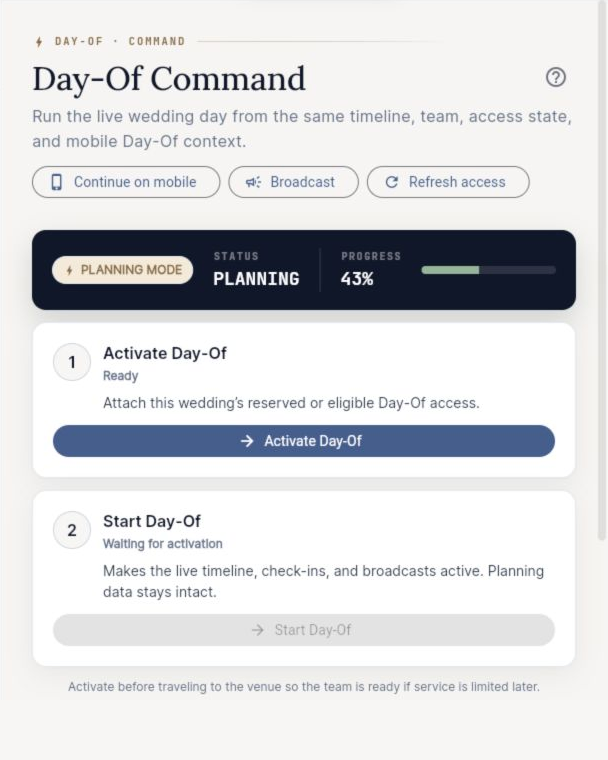
The demo you just ran is built on working controls for the exact coordinator problem: recover the timeline, protect fixed moments, update the right people, and keep the handoff visible.

25 min cascade recovered
4:30pm ceremony anchored
5 roles team views updated

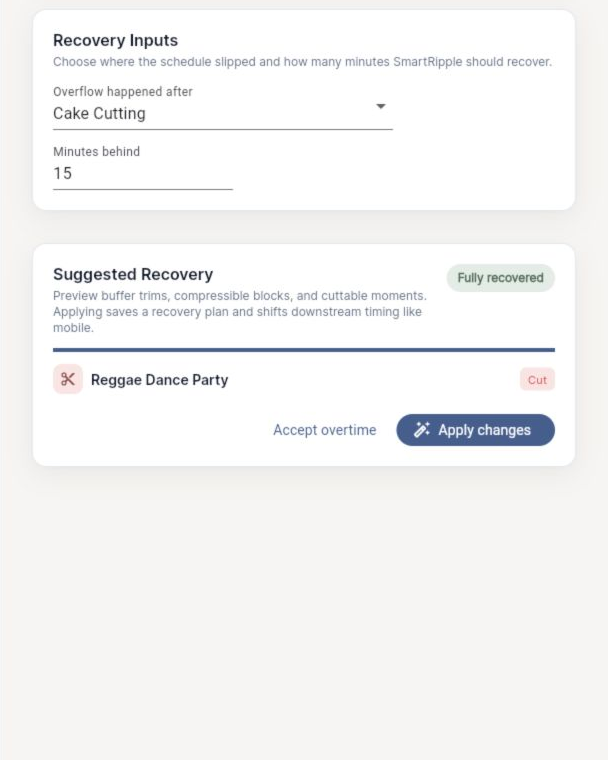
SmartRipple timeline recovery

When one block moves, every downstream block moves with it, except the moments you anchor.

Hair and makeup runs 25 minutes late. Push it once. First Look and Family Portraits shift later, Cocktail Hour compresses, and ceremony stays at 4:30pm.

You stop doing wedding-day mental math. The cascade is visible before you commit, so you can see what compresses, what stays fixed, and what needs a warning.

Anchored moments and compression warnings

Some blocks cannot move. Some can compress only so far. EventSync keeps that difference visible.

Ceremony is anchored to the officiant's window. Cocktail Hour can tighten, but catering gets a warning when pacing changes.

You are not just shifting times. You are protecting the day's non-negotiables while still recovering the delay.

Day-Of Command Center

The live controls sit in one place: broadcast, role preview, vendor check-in, alerts, and guest arrivals.

After the 25-minute push, Maya opens Command Center instead of starting another group text.

The coordinator gets a calm cockpit for the next action, not another scattered list of places to check.

Role-based views

Every person on the wedding sees only the blocks that involve them.

The bride sees her getting-ready window and the ceremony. The DJ sees load-in, sound check, entrance order, and reception cues.

Nobody is overwhelmed by blocks that do not apply to them. Nobody asks what time they are supposed to be there because the answer is on their screen.

Vendor check-in and handoff control

Track who has arrived, who is late, and who needs a reroute before the delay becomes another bride text.

DJ Marcus is at the wrong entrance. Maya reroutes him to Load-In C and marks him checked in once he is moving.

This is the missing control from the coordinator page: not just updating the timeline, but verifying the people who have to execute it.

Vendor broadcasts

Send one update instead of restarting the group text.

Push the timeline 25 minutes. EventSync drafts the broadcast: First Look 3:10, Ceremony still 4:30, DJ use Load-In C.

"Communicates well" is the single trait couples use to recommend coordinators. The faster the update moves, the calmer the day feels.

Set up in under fifteen minutes. Run the day from your phone.

Build the timeline

Start from a template or build the day block by block. Drag blocks to set times, roles, and locations.

Visual: timeline editor with three blocks populated.

Invite vendors and helpers

Add the photographer, DJ, catering, venue contact, and your couple. Assign a role to each team member so their day-of view stays focused on what they need.

Visual: invite list with role tags and a "send invites" button.

Run the wedding day from the live timeline

On the day, the timeline is live. Tap a block to mark it running late or done. SmartRipple cascades. Your broadcast goes out. You stay on the floor instead of on your phone.

Visual: live day-of view with a block flagged "running late" and a SmartRipple prompt.

Whatever kind of day-of work you do, this is the part that's been missing.

The solo day-of coordinator

You handle 6–10 weddings a year

You're the only set of hands on the floor. EventSync holds the timeline so you can hold the room. When something shifts, you tap once and five vendors know. You stop being the bottleneck the moment you're needed most.

The wedding planner managing multiple weddings

3–6 weddings a month with associates

Each wedding lives in its own day-of view. Your associate runs the timeline. You see live status from your phone without calling for an update.

The vendor-heavy wedding

10+ vendors, full production

Band, photo, video, catering, florists, lighting, transportation. Role-based views keep each vendor focused on their slice. One broadcast reaches everyone who needs the change. The bigger the vendor count, the more this matters.

Where EventSync fits next to the tools you already use.

We're not trying to replace your planning suite, your CRM, or your invoicing. Aisle Planner and HoneyBook are good at what they do. EventSync is for the part of the job none of them were built for: the day itself.

Capability EventSync Timeline Genius Aisle Planner / HoneyBook Google Sheets / PDF
Built for live wedding-day execution Yes Partial (text reminders) No No
Real-time vendor updates when timeline shifts Yes No No No
SmartRipple cascade with anchored blocks Yes No No No
Role-based mobile views per vendor and helper Yes No Partial (client portal) No
Vendor broadcasts and role-aware views Yes No No No
Planning-year CRM, invoicing, contracts No No Yes No
Detailed timeline builder Yes Yes Yes Manual
Works alongside your planning tool Yes Yes Yes
Best fit The wedding day Building timelines, sending day-of texts Running your planning business A starting point for small weddings

Keep using Aisle Planner or HoneyBook for the year before. Use EventSync on the day. They don't compete — they cover different parts of the job.

Switching from another day-of tool? See the side-by-side comparison →

Pay for the day. Or pay for the year.

Two ways to use EventSync. Pro is for coordinators running weddings every month. Wedding Pass is for one wedding when you want the day-of tools without a subscription.

Wedding Pass

For coordinators trying EventSync on one wedding, or planners running an occasional day-of package.

$29.99 per wedding
One-time purchase for a single wedding.
  • One wedding, full Pro features
  • SmartRipple cascade and anchored blocks
  • Vendor broadcasts
  • Role-based views
  • Same email support response time
Download free and buy Wedding Pass in app

No setup fees. No per-vendor charges. Wedding Pass is a one-time in-app purchase, and Pro subscriptions are managed through your App Store or Google Play subscription settings.

What coordinators ask before signing up.

Is this a planning app or a day-of app?
A day-of app. EventSync runs the wedding day itself — the live timeline, the vendor sync, the role-based views, the broadcasts. It plugs in next to Aisle Planner, HoneyBook, Dubsado, or whatever you use for the year before.
Does this replace a human coordinator?
No. It makes the coordinator faster. If you're a couple reading this, you should still hire someone. If you're a coordinator, this is the tool you use on the day — not a substitute for what you actually do.
How is this different from Timeline Genius?
Timeline Genius is a timeline builder with text reminders. EventSync is a live execution layer — when the timeline shifts, role-aware views and broadcasts help keep vendors and helpers aligned. They overlap on the timeline-building part. They don't overlap on the day-of part.
How is this different from Aisle Planner or HoneyBook?
Those are excellent for the planning year — leads, contracts, client portals, invoicing. They were not built to run the actual wedding day. Most planners keep both: their planning suite for the year, EventSync for the day.
Does it work if vendors don't download the app?
Not for basic broadcasts and status updates. Team members who need a live role view can join the event, while coordinators can still keep vendor contacts, notes, and check-in status inside the wedding plan.
What if the timeline changes during the day?
That's the entire point. Tap the block that's running late, choose how to push downstream, and SmartRipple cascades the rest. The broadcast preview drafts itself. You hit send. Seconds later, every affected vendor has the update.
Can the couple see a different view than vendors?
Yes. Every role has its own view. The bride sees her getting-ready window and the ceremony. The photographer sees the photo blocks. The DJ sees load-in and reception cues. Nobody is overwhelmed with information they don't need, and nobody is missing what they do need.
Can I use this for more than one wedding?
Yes. Pro Quarterly and Pro Annual are built for recurring weddings. Wedding Pass is for one wedding if you'd rather try the day-of tools before subscribing.
Does it work offline?
Live sync needs a network connection. Before the wedding day, export or print the timeline as a backup so you are not dependent on venue Wi-Fi.
Can I print a backup?
Yes. EventSync supports PDF and CSV exports for planning data, and we recommend bringing a printed timeline backup to any wedding you run.
The next wedding is on the calendar. Run it from EventSync.

Download EventSync free and use it on your next wedding. If it doesn't earn its place by the time the ceremony starts, you've lost nothing.

Works alongside the planning tools you already use. Built for the wedding day, not the year before it.