Private staging preview · Applications and participant access are not open yet.
Founding 50 · First wave: 5 planners

Two weddings. The complete EventSync Day-Of production experience. Complimentary.

Plan in EventSync Workspace. Run the wedding in Day-Of Command. If timing changes, SmartRipple suggests recovery options; the planner must review and apply any change.

Two approved weddings. Complete supported product access. SmartRipple included at every valid access level. No card. No automatic renewal.

Two approved wedding runs
No card or automatic renewal
The planner controls every decision
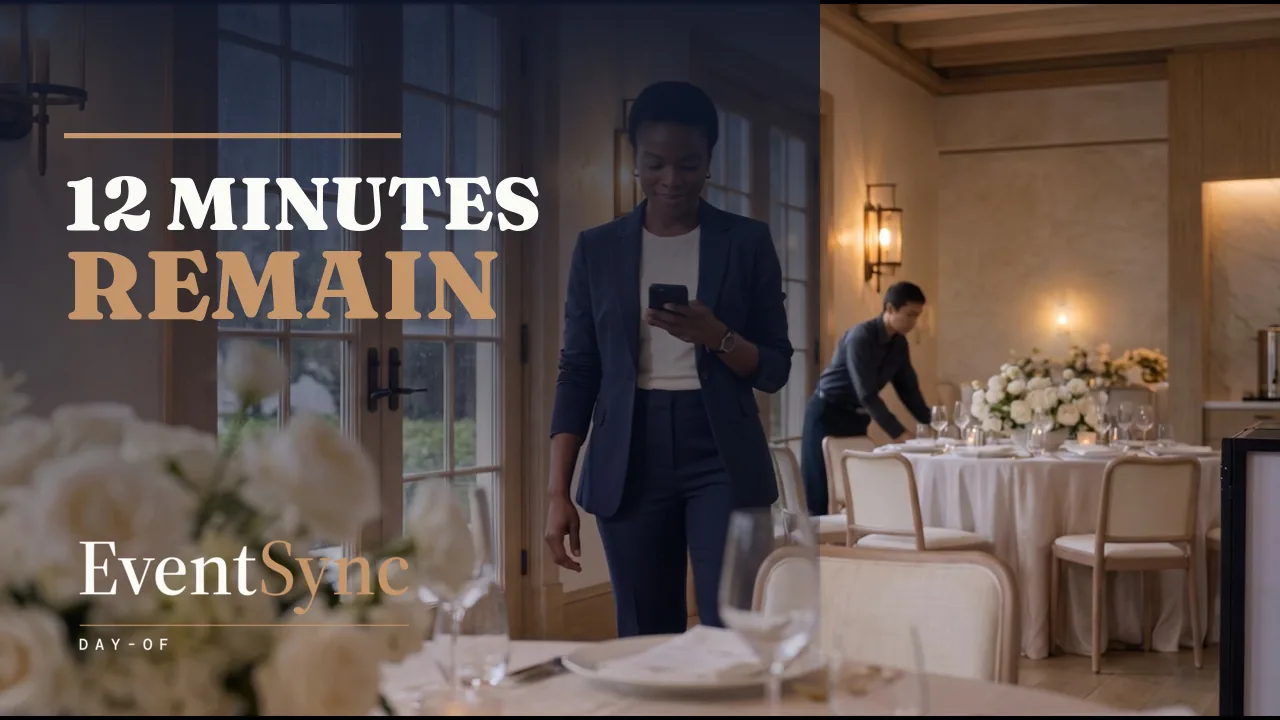
Nora, the wedding planner in the Twelve Minutes film, standing in a populated reception room
Twelve Minutes EventSync Day-Of cinematic brand film · 1:30

For planners responsible for the wedding-day timeline.

The first wave is intentionally limited to professional wedding planners and day-of coordinators who have timeline authority, two suitable weddings within the program window, and time to prepare, rehearse and debrief.

A strong first-wave fit

You operate weddings professionally and want to test whether one connected workflow can carry from planning into the day itself.

  • You lead the wedding timeline or work directly with the authorized lead.
  • You expect to run two suitable weddings within 180 days of final acceptance.
  • You can bring an existing timeline or run of show for each wedding, identify at least one team member who will act on the plan, and complete setup, rehearsal, a written readiness decision and two candid debriefs.
  • You understand that EventSync is software and limited remote product support—not an onsite coordination service.

The complete supported product—not a reduced pilot tier.

Approved Founding Planners receive the supported features generally available in the complete current production release for the approved workflow and platform across both wedding runs.

Full access still respects product-wide safety boundaries.

SmartRipple is universal at every valid EventSync access level; it is not a paid add-on or special Founding-only entitlement. Vendor invitations are the only product-wide hold shown here. Wedding Day Assistant is implemented but is not currently approved for Founding wedding use until its exact-event authorization and supported-client checks pass. Before final acceptance, EventSync records in writing the supported platform, app version, included features and any genuine product-wide hold.

  • No credit card, automatic renewal or payment is required for the two approved runs.
  • Every suggested timeline change remains subject to authorized human review.
  • Each wedding must independently pass setup, rehearsal and written readiness before live use.

Exactly two approved events: complimentary Founding access is tied to the accepted planner’s verified business and exactly two approved event records. It is non-transferable, does not unlock unrelated events on the account and does not include a third complimentary wedding.

AI-assisted portrait of Kali McCarthy holding a camera near a wedding couple

AI-assisted portrait of Kali McCarthy.

A note from the founder.

“Every planning app I tried stopped working the moment the wedding day actually started. So I built one that helps the people running the day stay aligned when nobody has time to hunt for updates.”

I’m keeping this first cohort small to learn where EventSync genuinely helps, where it creates friction and what a professional planner needs before trusting it twice. Candid criticism is welcome; a positive review, testimonial or public post is never required.

Kali McCarthy · Founder, EventSync Day-Of

Twelve Minutes

In this illustrative scenario, family photos put the reception 20 minutes behind. Room setup and existing buffers recover eight before SmartRipple opens. Nora then reviews options for the remaining 12: seven from the portrait buffer and five from the room flip after Priya confirms her team can do it. Nora applies the plan; the team performs the work.

Cinematic advertisement created with AI-generated characters and environments. Product behavior is shown through a controlled illustrative demo. The film is a story—not proof of current runtime behavior.

Read the complete transcript

00:00Zoe and Liam's reception is about to begin. But family photos are running late.

00:07PRIYA: Photos put us twenty minutes behind.

00:10NORA: Room setup and buffers saved eight. Twelve remain.

00:14Nora opens EventSync Day-Of. In SmartRipple, she reviews the remaining twelve.

00:20Its balanced plan protects the entrance and suggests seven minutes from the portrait buffer.

00:27Then five from the room flip—a proposed recovery of all twelve.

00:32NORA: Priya, can your team make up five minutes?

00:36PRIYA: Yes. We'll be ready.

00:38NORA: Good. I'll apply the balanced plan.

00:40Nora applies her choice, then briefs the team.

00:44NORA: Priya, make up five minutes. Marcus, mic and entrance. Camila, doors. Everyone, stay on your assignment. Let's move.

00:53SmartRipple suggests. Nora decides. Her team does the work.

01:08ROOM CREW: The room is ready.

01:11NORA: Open the doors.

01:20Twelve minutes recovered. Zoe and Liam walk in right on time.

01:26EventSync Day-Of. Plan in Workspace. Run Day-Of.

The recovery is a chain of human decisions—not magic.

DelayPhotos create a 20-minute slip.
Ordinary recoverySetup and existing buffers absorb eight.
SmartRippleOptions are proposed for the remaining 12.
ConfirmPriya confirms her team can make up five.
DecideNora reviews and applies the balanced plan.
ExecuteThe wedding team performs the work.
Three short workflow demonstrations

See the handoffs a planner should not have to chase.

Each clip stays under 30 seconds and shows one focused workflow: a targeted update, a photographer’s role view, and the same event moving from Workspace planning to mobile Day-Of execution.

Targeted broadcast0:25

One Update

The timeline stays shared. Only the affected roles receive the active alert and acknowledgement request, so the planner can see who confirmed.

Read the One Update guide

Evidence boundary: these are controlled product demonstrations built with fictional data and authentic interface components. They explain the intended workflow; they do not replace the exact-build, authorization, persistence, offline or staging proof required before Founding 50 activation.

See the product—not only the cinematic story.

Captured from the deployed EventSync Workspace 2.2.10 (build 154) using a test wedding. The account name, wedding title and internal IDs are excluded; the published images use cropping and neutral padding only. These are product captures—not images from the cinematic film.

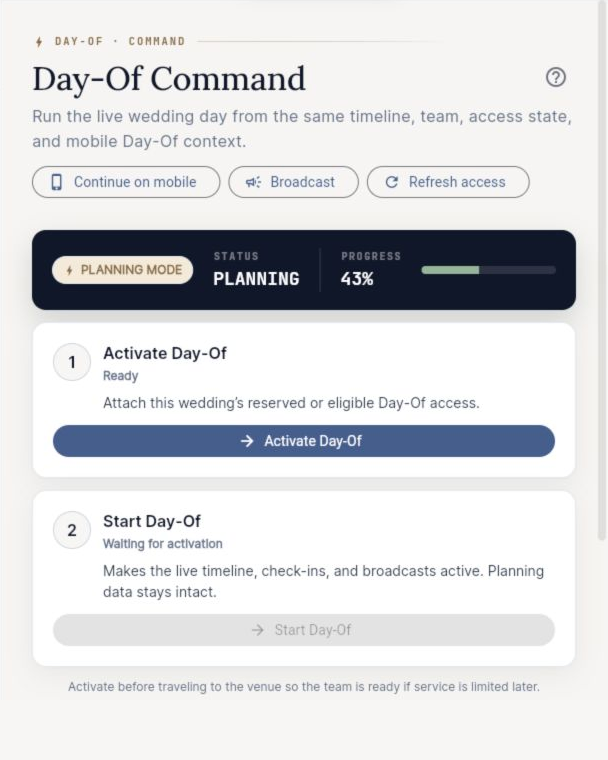
EventSync Workspace 2.2.10 build 154 Day-Of Command pre-activation screen for a test wedding
Day-Of Command Pre-activation setup and readiness for the selected test wedding.
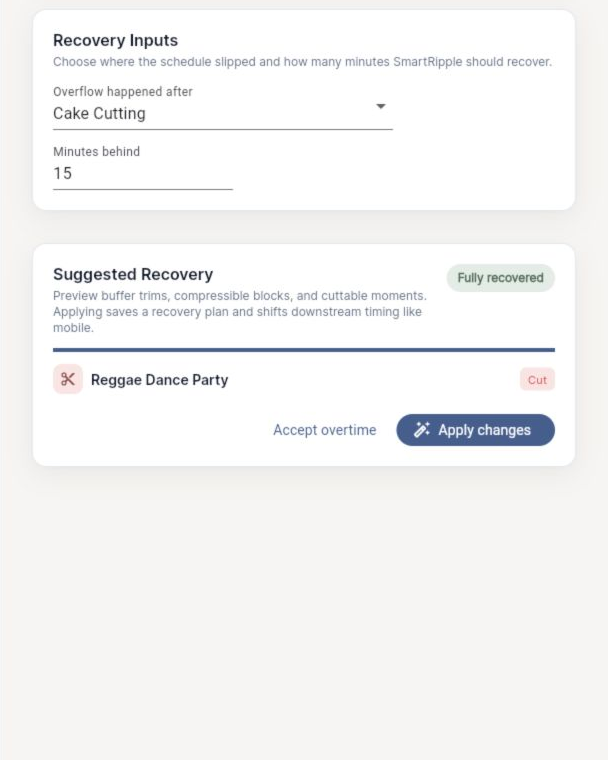
EventSync Workspace 2.2.10 build 154 SmartRipple recovery controls for a test wedding
SmartRipple controls The planner reviews recovery inputs and a proposed change before choosing whether to apply it or accept overtime.
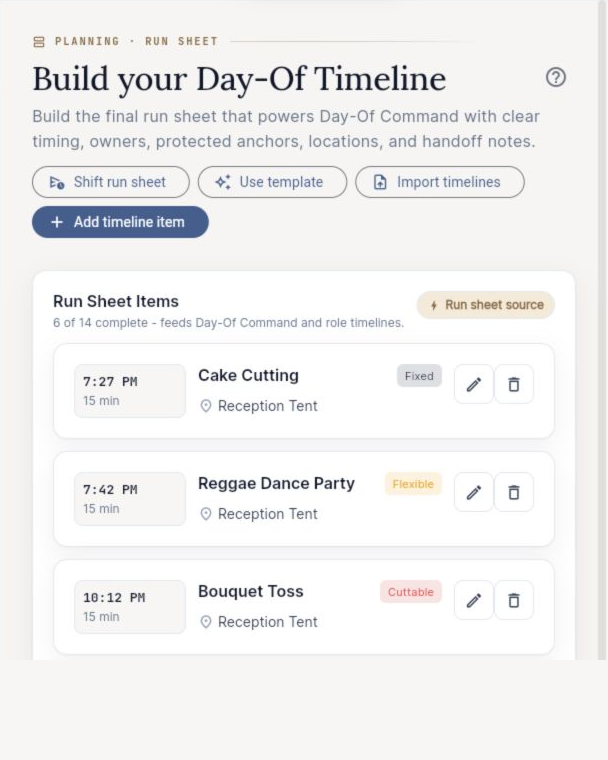
EventSync Workspace 2.2.10 build 154 Run Sheet timeline screen for a test wedding
Run Sheet The structured timeline that feeds Day-Of Command and role timelines.

Evidence boundary: these captures document the named Workspace surfaces in release 2.2.10 (build 154) at capture time. They do not prove active Day-Of operation, a valid end-to-end SmartRipple recovery, supported-client authorization, offline behavior, persistence or two-event access. No SmartRipple change was applied. Applications remain closed while those conditions are verified.

Why applications are still closed

Before a planner is asked to trust EventSync at a real wedding, the complete supported journey must be proven in an isolated staging environment—not inferred from screenshots or an internal build.

  • Supported clients: prove the signed-in Workspace, iOS and Android journeys against the exact release lineage.
  • Two-event boundary: prove exactly two approved events, denial of a third complimentary event and preservation of any separate paid access.
  • Planner control: prove SmartRipple review and apply, team-role access, persistence and the specifically supported offline actions.

Vendor invitations remain disabled for all production users until their authorization, privacy and end-to-end checks pass. Wedding Day Assistant is implemented but excluded from Founding wedding use until its exact-event authorization and supported-client proof pass.

Detailed prelaunch status For reviewers who want the full boundary

Workspace and mobile

Proof pending

The signed-in supported-client path is being reconciled against the exact release lineage.

Day-Of Command and SmartRipple

Proof pending

Authorization, review and apply, persistence and the two-event scope still require complete staging proof.

Team access

Proof pending

Roles exist, but live supported-client onboarding and access behavior are still being verified.

Wedding Day Assistant

Founding inclusion held

Implemented, but excluded from Founding wedding use pending exact-event authorization and supported-client proof.

Supported offline actions

Proof pending

Specific supported actions are being live-verified. EventSync does not promise perfect or total offline operation.

Vendor invitations

Product-wide hold

Disabled for all production users until authorization, privacy and end-to-end behavior are independently verified.

Learn it once. Then prove the workflow can repeat.

One wedding is not enough to distinguish first-time learning from a repeatable operating process. The two runs are designed to answer different questions.

Wedding 1

Guided Run

Learn EventSync, validate setup and discover friction with closer product guidance.

  • Guided Workspace and Day-Of setup
  • Timeline-readiness review and shadow run
  • Full rehearsal and written readiness decision
  • Agreed remote product-support window
  • Factual debrief after the wedding
Wedding 2

Workflow Run

Recreate the operating process with less setup help and measure what became reusable.

  • Planner-led setup using the first run’s workflow
  • Focused readiness review and repeat check
  • Same human-control and fallback boundaries
  • Lighter agreed product-support window
  • Second debrief comparing both runs

A supported product pilot, not an onsite service.

Prepare

Wedding 1 normally includes guided setup, a timeline-readiness review, a 20–30 minute shadow run and a full rehearsal. Wedding 2 uses a shorter repeat check when the workflow and team remain similar.

Run safely

Each wedding requires a written readiness decision and an independent fallback plan. EventSync support covers verified product behavior and technical incidents—not wedding operations or emergency response.

Learn twice

Each wedding ends with a factual debrief. After Wedding 2, the workflow review compares setup time, repeatability, planner control, product friction and support need.

Before applications open: supported geography, time zones, support channel, hours and response expectations will be published and agreed in writing before acceptance.

Interested in becoming a Founding Planner?

The first five professional places will open in stages: three planners first, then two more only after the initial progression review. Applying will not guarantee acceptance or live support.

The application is designed to take about three minutes. We aim to provide one of three preliminary decisions—provisionally qualified, waitlisted or declined—within two business days after applications open.

Before the application opens, we are verifying:
  • the isolated staging environment and exact release lineage;
  • bounded data collection, anti-abuse and restricted review;
  • two-event access, third-event denial and paid-access preservation;
  • supported Workspace, iOS and Android paths.
Applications are not open yet

No form is active and no application data is being collected on this preview.

The important details, plainly stated.

Does Founding 50 mean ownership or permanent free access?

No. It means early program participation. It does not imply company ownership, equity, employment or permanent free access. The complimentary access is limited to two approved wedding runs inside the reviewed program terms.

Why is it called Founding 50 if the first wave has five planners?

Founding 50 is the full learning program. It begins with five planners so EventSync can verify support, safety and repeatability before inviting a larger group. The first three places open before the next two.

Is SmartRipple a special Founding 50 feature?

No. SmartRipple is universal and included at no additional cost at every valid EventSync access level. The Founding offer adds two supported real-wedding runs, guided implementation and workflow learning.

Does EventSync change the timeline automatically?

No. SmartRipple can suggest recovery options using available buffers and flexible blocks. The planner reviews, edits, applies or rejects the proposal. EventSync does not autonomously contact people or perform the work.

What happens if a wedding is not ready to run with EventSync?

The planner follows the normal non-EventSync operating plan. Setup or rehearsal access alone does not consume a complimentary live run, and an EventSync-caused readiness, access or material product failure does not consume it.

How long is the two-wedding window?

Both approved weddings must normally occur within 180 days of final acceptance. Exact dates and support windows are checked before a final place is promised.

What information will the first application request?

The first application asks only about professional fit, broad timing, timeline authority, readiness and support availability. Do not enter client or guest names, exact dates, venue addresses, timeline content, medical or dietary information, invitation links or payment information. Any later wedding-specific intake uses a separately approved secure process.

What happens after Wedding 2?

The complimentary pilot ends with no payment due and no automatic renewal. The planner can separately choose any later approved continuation. Private feedback is requested; a testimonial or case-study permission remains optional and separate.

Do I have to provide a testimonial or positive review?

No. Candid private feedback is welcome. A positive review, testimonial, public post or endorsement is never required, and any later case-study permission would be separate and optional.

Ready when the gates are—not before.

Applications will open only after the product, security, privacy and operating proofs are complete and the controlled launch receives its next written approval.

Review application status