When the wedding timeline slips, the first move is not to panic-edit the whole day.
A late vendor, long toast, slow room flip, or weather move can knock the timeline loose. The useful question is what can move without damaging the moments that must stay protected.
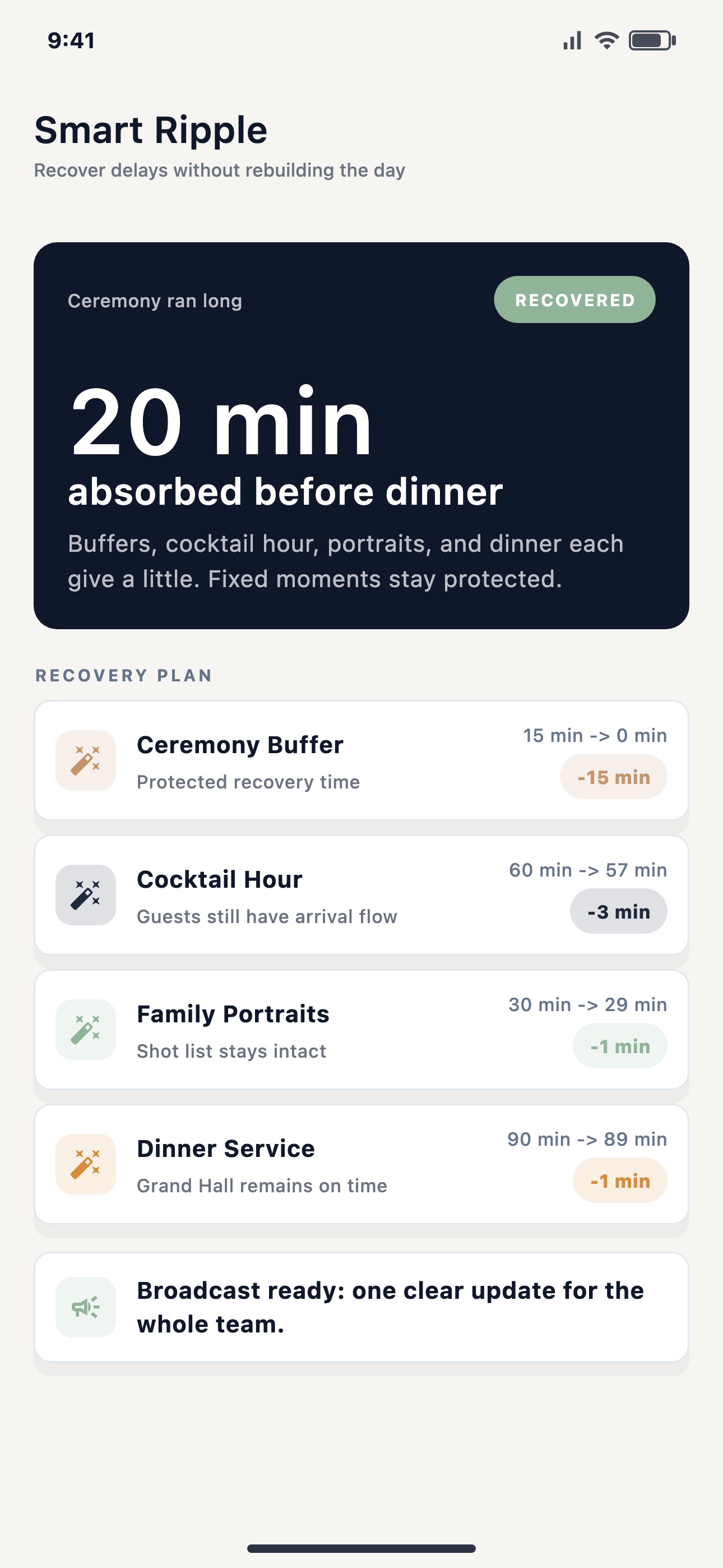
Most timeline problems get worse because the recovery decision happens too late. The coordinator knows something slipped, but the team keeps moving as if the printed schedule is still true. Then the next cue arrives, and the real conflict finally shows up.
A better recovery process starts with the shape of the day. Some moments are fixed. Some blocks have buffer. Some blocks can compress. Some instructions need to go only to one role. The coordinator needs to see those differences before sending an update.
Recovery is deciding which moments stay protected, which flexible blocks can absorb the delay, and who needs the new instruction after approval.
A practical recovery order
Protect fixed moments
Ceremony, dinner service, key entrances, speeches, and contracted vendor windows should not drift casually.
Use real buffer
Buffer is only useful when the lead knows where it is and what it was meant to protect.
Compress flexible blocks
Some portrait, transition, setup, and open time can shrink. The team should know exactly what changed.
Approve before broadcasting
The planner or authorized lead should approve team-visible timeline changes before they ripple outward.
Where EventSync fits
EventSync's SmartRipple recovery system is built for this kind of decision. It can suggest ways to recover time by protecting fixed moments and borrowing from flexible buffers or compressible blocks. Wedding Day Assistant can surface the risk and the recovery path, but EventSync is not an autonomous AI decision maker.
The human lead still approves. Once the decision is clear, EventSync can help route the update through the day-of command flow so each role gets the details it needs.
What to check before sending a recovery update
- Name the exact problem: late arrival, overrun block, weather change, setup delay, or missing person.
- List which future moments are fixed and should stay protected.
- Find buffer or compressible time before moving a major anchor.
- Decide which roles need the update and which roles do not.
- Require acknowledgement when the next handoff depends on the change being seen.
Day-Of Pain Point Series
Next: how vendor check-ins stop arrival updates from living in a group textPreview SmartRipple inside EventSync
See how EventSync connects timeline recovery, team broadcasts, and planner-approved updates for the real wedding day.
Open the product demo